
The best real estate video for a waterfront property starts at the water. A drone reveal, a dock walk at golden hour, or a time-lapse from the deck communicates the setting in the first five seconds, which is where buyers decide to keep watching.
This page gives you 10 specific ideas ordered by visual impact, an on-page shot list, copy-paste captions for Reels and listing posts, and a faster path to the finished video from your listing photos.
Best video ideas for waterfront properties
The five highest-impact waterfront video ideas are a drone aerial reveal over open water, a golden-hour dock walk, an outdoor entertaining scene, an interior shot framing the water through windows, and a sunset time-lapse from the deck.
Here are 10 ideas ranked by visual impact. Mix and match based on the property’s specific features.
1. Drone aerial reveal
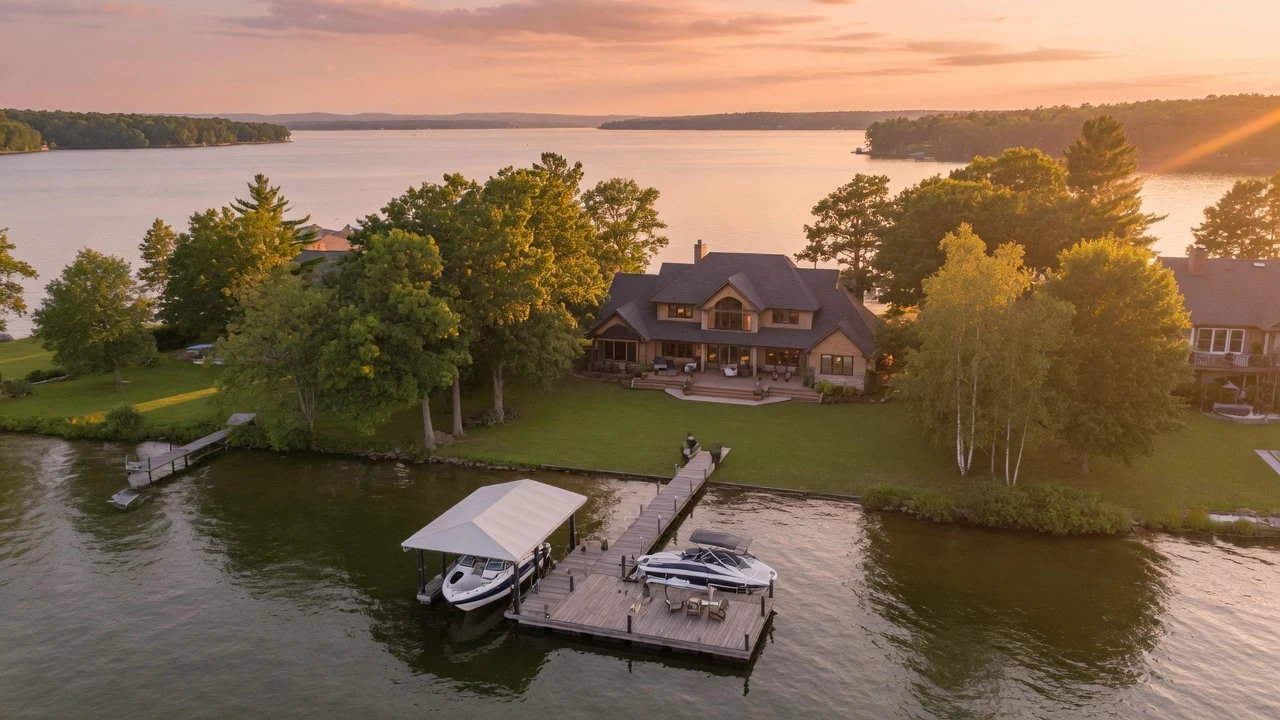
Open wide over the water, then fly slowly toward the property until the dock and home fill the frame. This single shot communicates acreage, water frontage, and location in under five seconds. It is one of the strongest visual hooks for short-form waterfront listing videos because it shows the setting immediately.
Commercial drone use requires FAA Part 107 certification. If you don’t hold that certificate, hire a licensed local operator for the session.
2. Golden-hour dock walk
Film a slow walk from the land end of the dock to the water’s edge during golden hour, roughly the first hour after sunrise or the last hour before sunset, depending on season, tree cover, and shoreline direction. The warm light reflects off the surface and the perspective draws the viewer toward the water.
End the clip facing out over open water for a natural, unhurried close. Pair it with a calm instrumental track and keep it under 10 seconds.
3. Outdoor entertaining scene
Set up the deck, outdoor kitchen, or fire pit and film the space as though guests have just arrived. Pull back to reveal the water behind the furniture, then cut inside. This sequence frames the property as a lifestyle destination.
A lit fire pit at dusk, a table set with the water in the background, or a hammock near the shoreline reads as aspirational without requiring elaborate staging.
4. Interior-to-view framing
Stand inside the living room or primary suite, focus on the interior, then slowly pull focus to the water visible through the windows. This one shot captures the quality of the interior and the reason the price is what it is.
Film from two angles: center of the room and one corner. The corner angle gives a sense of depth in both the room and the water beyond it.
5. Sunrise or sunset time-lapse
Set up a tripod on the deck and film a 5 to 10 minute time-lapse of the sky and water changing color. Compress it to 5 to 8 seconds in the edit. The moving water and shifting light create a living postcard that static photos can’t replicate.
Most phones have a built-in time-lapse mode. Frame the horizon at the top third of the frame and keep the dock or shoreline in the lower third as a grounding element.
6. Boathouse or boat lift feature shot
If the property has a boathouse, covered boat lift, or jet ski lift, give it a dedicated 5-second clip. Buyers searching for waterfront listings often filter by these amenities, and a direct shot confirms the feature faster than a description.
Open the boathouse doors if possible to show scale. A low angle from the dock edge looking up at the structure communicates size effectively.
7. Water activities lifestyle shot
Film a kayak, paddleboard, or canoe staged at the shoreline. The gear alone signals the lifestyle the property enables without requiring anyone on camera.
Keep it brief: 3 to 4 seconds in the final edit. This cutaway works between interior and exterior sequences to break the pacing.
8. Aerial shoreline sweep
Fly the drone parallel to the shoreline at low to medium altitude to show the water frontage and the property’s position relative to its neighbors. This is a measurement shot rather than a hero shot: place it in the middle of the video after the establishing reveal.
9. Ripple and reflection detail
Go low and close to the water surface from the dock edge. Film the light playing on the water for 5 to 6 seconds. This detail clip creates a sensory pause in the edit and reinforces the waterfront setting at a scale the aerial perspective cannot reach.
10. Narrated water access tour
Film a 30 to 45 second narrated clip that opens at the street address, moves to the water, names the body of water (lake name, river, bay, or ocean designation), and closes at the dock. This anchors the listing for buyers who search by waterfront type.
Record the narration separately in a quiet room to avoid wind noise near the water. Use a lavalier microphone if possible.
Waterfront shot list: what to capture on filming day
A complete waterfront shot list covers six zones: the street approach, the dock and shoreline, outdoor living spaces, interior rooms with a water view, bonus amenities such as a boathouse or private beach, and one aerial establishing sequence.
Use this list to check each shot before you leave the property.
Before filming, check dock stability and footing, wind and glare conditions at the planned shoot time, shoreline access permissions, and any local drone ordinances that apply beyond federal Part 107 certification.
Exterior
Dock and shoreline
Outdoor living
Interior
Amenities
Closers
Waterfront shot list
- **Exterior:** Slow push from the street toward the front door as the establishing hook
- **Exterior:** Full exterior with the water visible behind the home
- **Exterior:** Side elevation showing the yard-to-water distance
- **Dock and shoreline:** Dock walk from land to water's edge, preferably at golden hour
- **Dock and shoreline:** Low-angle shot from the dock edge facing open water
- **Dock and shoreline:** Aerial reveal and shoreline sweep
- **Dock and shoreline:** Boat lift, jet ski lift, or covered slip if present
- **Dock and shoreline:** Private beach or sandy shoreline if present
- **Outdoor living:** Deck or patio wide shot with water behind
- **Outdoor living:** Fire pit or outdoor kitchen staged at dusk
- **Outdoor living:** Outdoor seating area with the waterline in the background
- **Outdoor living:** Landscaping or garden at the water's edge
- **Interior:** Living room or great room with the water view in frame
- **Interior:** Primary suite window view, with a rack focus from interior to water
- **Interior:** Kitchen or dining room with a water-facing window
- **Amenities:** Boathouse interior if the property has one
- **Amenities:** Kayak, paddleboard, or canoe staged at the shoreline
- **Amenities:** Fishing dock or fish cleaning station if present
- **Closers:** Sunset or sunrise time-lapse from the deck
- **Closers:** Aerial pullback revealing the full property from above
- **Closers:** Dock-end closing shot with the camera facing open water
For smooth movement through tight indoor spaces, the real estate walkthrough video guide covers handheld and gimbal technique. The real estate video editing page covers the tools that handle drone footage import and color matching across interior and exterior clips.
The fastest way to make a waterfront listing video
Upload 12 to 20 listing photos to PropFade, confirm the address and key details, and export. PropFade animates each photo with motion, drafts a voiceover from the listing facts, adds captions, and renders three finished formats in about two minutes.
This path fits the waterfront listings where scheduling a drone flight and a golden-hour session takes multiple days. If the listing photography already shows the dock, the view, and the outdoor living space, the photo set is enough to produce a publish-ready video.
You get a 9:16 vertical cut for Reels and TikTok, a 1:1 square cut for the feed, and a 16:9 horizontal cut for your listing page and YouTube. One photo set, three ready-to-post videos.
The ai real estate video editor section explains how the animation and voiceover generation work. Real estate video templates show planning structures for pacing and caption placement.
Make a waterfront listing video
Upload your photos and get a finished video back in about two minutes.
For real estate video marketing strategy across every format, the guide maps each cut to its best distribution channel and posting cadence.
Captions and hooks for waterfront listings
A strong waterfront caption opens with the view, names a specific feature (the dock, the water frontage, the body of water), and closes with a clear next step. Lead with the setting first, then the specs.
Copy any of the options below for Reels, TikTok, Instagram, or listing posts.
Reel and TikTok hooks (the first 2 seconds decide the view count)
- “Your own dock. 47 feet of private frontage.”
- “Woke up to this. Every morning.”
- “From the kitchen to the kayak in under two minutes.”
- “Lake views, a covered boat lift, and not a neighbor in sight.”
- “This is what waterfront actually looks like.”
- “Fire pit. Dock. Sunset. [Address here].”
- “Been searching for a lakefront property? Stop and watch this.”
Listing post captions (Instagram feed or Facebook)
- “Private dock, covered boat lift, and 80 feet of shoreline on [lake name]. The kind of listing you tour in person and put an offer on the same day. Tour link in bio.”
- “Morning kayak. Evening bonfire. This [city] waterfront delivers both, plus [X] beds, [X] baths, and [sq ft] of living space. Showings open [date].”
- “Waterfront on [body of water]: private dock, boathouse, and a deck designed for the view. Listed at [price]. Details in bio.”
LinkedIn captions (agent branding)
- “Just listed: [X] acres of private waterfront on [lake name]. The drone footage carried the marketing. What’s your go-to shot for a listing with a dock?”
- “Waterfront listings teach you something: buyers respond to the view before the description. A 60-second Reel on this dock became the anchor asset for the listing campaign.”
Property description openers
- “Wake up to open water views from the primary suite, then walk 40 feet to your private dock.”
- “From the covered boat lift to the outdoor kitchen overlooking the lake, every detail of this [X]-bed home was designed around the water.”
For distribution strategy and posting cadence, the real estate video marketing guide covers which format goes where. For caption and video examples across property types, the real estate video examples page and the real estate video social media guide have additional models.
Frequently asked questions about waterfront listing videos
The three most common questions about waterfront listing videos cover what type to produce, how to distribute it, and which export format to use for each platform.
Frequently asked questions
Start with a drone aerial reveal over the water, then add a golden-hour dock walk and an outdoor entertaining shot. These three clips cover the setting, the amenity, and the lifestyle, which are the top reasons buyers choose a waterfront property over an inland home. Keep the total video between 45 and 90 seconds for social posts.
Post the vertical 9:16 cut to Reels and TikTok with a hook that names the dock or the water frontage in the first two seconds. Share the 1:1 square cut to the Instagram and Facebook feed with a listing-style caption. Embed the 16:9 horizontal cut on your MLS listing page and website. The drone reveal performs strongest as a Reel. The real estate video marketing guide covers the full posting cadence.
Use 9:16 vertical for Reels, TikTok, and Shorts; 1:1 square for the Instagram and Facebook feed; and 16:9 horizontal for your listing page, YouTube, and email. Shoot drone footage in horizontal 16:9 and crop down for the vertical cut, since aerial footage loses less detail in a vertical crop than interior footage does. PropFade exports all three formats from one upload.