
Pinterest is a planning platform where buyers and sellers actively collect ideas, guides, and inspiration for their next move. Agents who post there reach an audience already in research mode, often months before they contact anyone.
This page gives you 25 specific content ideas, the right image and video specs, a set of caption templates you can copy, and the posting habits that keep a Pinterest account growing without daily effort.
Why Pinterest works for real estate agents
Pinterest works for real estate because buyers use it as a search engine: they search “first-time buyer checklist,” “what to fix before selling,” and “dream kitchen remodel,” save results to boards, and return to those boards for weeks before making any decisions.
Home, garden, and decor content consistently ranks among Pinterest’s most-searched categories. Real estate fits naturally across all three, whether the pin is a staged listing photo, a curb appeal tips graphic, or a neighborhood spotlight. Unlike feed-driven platforms where a post has a 24- to 48-hour window, a Pinterest pin can surface in search results for three to six months after posting, making each piece of content worth far more per hour of production time.
Buyers on Pinterest are in active planning mode. They collect floor plan ideas months before they tour homes, and sellers research staging ROI and renovation budgets before they call an agent. Content that reaches them at that stage builds recognition before the first conversation happens.
Pinterest also drives direct website traffic through the link attached to each pin. Every listing tour or buyer guide becomes a traffic source, pointing planners from the platform directly to your listing page or contact form. For a broader view of how Pinterest fits a full distribution plan, real estate social media marketing covers the channel mix across all platforms.
The platform rewards visual and informational content: infographics, checklists, and vertical video tours consistently outperform text-only posts. Agents who build six to eight boards around specific buyer and seller topics, and post consistently into those boards, attract a following of people actively planning a purchase or sale in the months ahead.
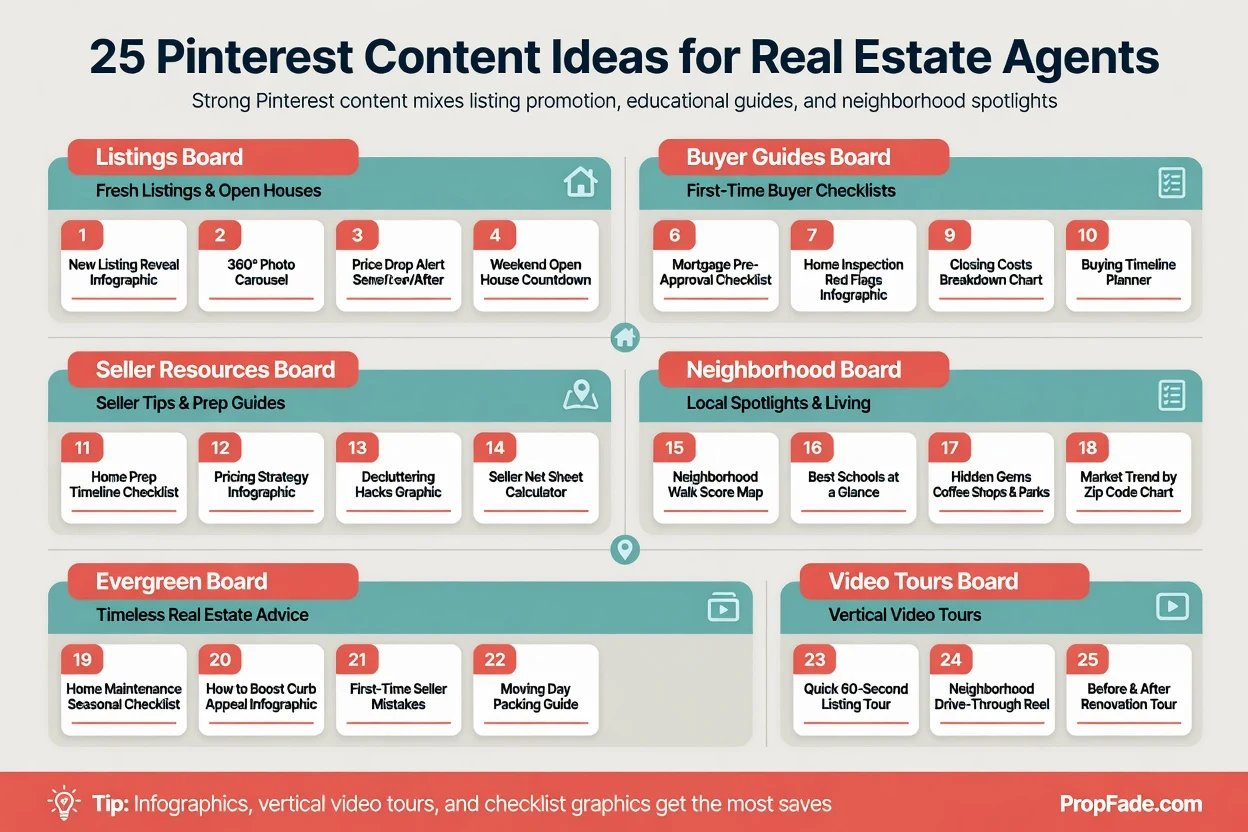
25 Pinterest content ideas for real estate agents
Strong Pinterest content mixes listing promotion, educational guides, and neighborhood spotlights. The formats that get the most saves are infographics, vertical video tours, and checklist graphics, because Pinterest users are planners who collect practical resources they intend to use.
Here are 25 specific ideas organized by board type.
Listing and tour pins (link directly to your listing pages)
- A 15-second vertical video tour of a featured listing, cut from existing Reels footage
- A “Just Listed” static pin with price, beds/baths, square footage, and a link to the full listing
- A before-and-after staging photo pair showing the transformation
- A floor plan graphic with room labels and a call-to-action to book a showing
- A “What $[X] buys in [City]” comparison pin featuring two or three current listings
- A short video highlight of the listing’s best single feature: the kitchen island, the view, or the backyard
Buyer education boards (high-save, evergreen)
- A first-time buyer checklist infographic with 12 to 15 steps on one vertical graphic
- A home inspection checklist pin formatted for saving and printing
- A mortgage pre-approval steps graphic, from application to conditional approval letter
- A “Questions to ask at every showing” list pin buyers save and carry to tours
- A closing costs breakdown infographic with typical percentage ranges for your market
- An offer strategy tip graphic for buyers in competitive bidding situations
Seller education boards (attracts research-phase traffic)
- A home staging checklist graphic, room by room, with numbered steps
- A “Top renovations before you list” infographic with ROI ranges by category
- A listing timeline graphic from listing appointment to closing day
- An explainer pin demystifying how agents price a home using comparable sales
- A net proceeds estimator graphic covering commission, payoff, and what the seller keeps
Neighborhood and local content (drives search visibility)
- A neighborhood spotlight pin: one photo, the school district or boundary info, one price range, one landmark or amenity
- A local coffee shop or restaurant guide graphic for buyers researching the area
- A commute time reference pin from your primary zip code to the nearest major employment center
- A “Notable streets in [Neighborhood]” curated list pin noting architecture style, walkability, or proximity to parks and transit
- A seasonal event calendar graphic for your market, linking to your website’s community guide
Evergreen inspiration boards (sustains follower growth)
- Curb appeal improvements organized by budget tier, formatted as a numbered tip graphic
- Interior design trends for the current year, linked to a staging guide blog post
- A “What agents wish first-time buyers knew” tip series, one insight per pin
For listing tour videos, an ai real estate video editor produces a 9:16 vertical listing video that uploads directly to Pinterest as a video pin, so no separate edit is needed.
Pinterest image and video specs
| Item | Spec | Notes |
|---|---|---|
| Standard image pin | 1000 x 1500 px; 2:3 ratio | JPG or PNG, under 20 MB |
| Square pin | 1000 x 1000 px; 1:1 ratio | Useful for cross-posts from the grid |
| Video pin | 1000 x 1500 px; 2:3 ratio | 15 to 60 seconds for listing tours |
| Pin title | Up to 100 characters | Use the location, property type, or buyer goal |
| Pin description | Up to 500 characters | Write searchable text that explains the pin and links to the next step |
The 2:3 vertical format takes up more space in the Pinterest discovery grid than square or landscape images. Pin titles and descriptions both feed the platform’s search index directly, so write them as short SEO fields rather than generic captions.
Common Pinterest mistakes real estate agents make
The most common mistake is posting horizontal listing photos without adapting them to the 2:3 vertical format. A landscape image shows smaller in the Pinterest grid than a vertical competitor pin targeting the same search term, reducing clicks before a single user reads the caption.
Posting horizontal images. Most MLS photos are 16:9 landscape. Adding a text bar at the top and bottom, or cropping to 2:3, takes one extra step but claims about 50 percent more height than a square pin at the same column width, and substantially more height than a landscape pin competing in the same search.
Skipping keyword optimization. Pinterest functions as a visual search engine. Board names like “My Listings” and “Real Estate Tips” do not match search queries. Board names like “Homes for Sale in Phoenix AZ” and “First-Time Buyer Resources” align with what buyers and sellers actually type.
No link on the pin. Every pin should point to a useful destination: a listing detail page, a neighborhood guide, a contact form, or a video tour. Pins without links generate saves but send no traffic, which eliminates one of the primary reasons to maintain the platform.
Inconsistent posting cadence. Pinterest’s algorithm favors accounts that add fresh pins regularly. Three to five pins spread throughout a day outperforms a burst of 20 pins once a week with nothing in between. Pinterest’s built-in scheduler lets you queue a full week of pins at once.
Posting only promotional content. A profile that contains nothing but active listings feels thin to a new visitor. Mixing buyer guides, seller resources, neighborhood spotlights, and design inspiration alongside listings gives buyers a reason to follow and return over time.
Ignoring board cover images. Profile visitors scan boards before following. Setting a custom cover image for each board with consistent fonts and colors signals a professional, organized account and converts more profile views into follows.
The real estate social media guide covers posting cadence and content calendars across all major platforms, including how to schedule Pinterest alongside Reels and LinkedIn without doubling the workload.
Captions and posting tips for Pinterest real estate content
Pinterest captions are pin descriptions, and they function as SEO copy. A strong description names the location, the content type, and the reader’s goal, uses natural search phrases, and ends with a clear next action.
Caption formula for a listing pin:
Open with the property’s best feature, follow with the key specs and location, then close with a link action.
Example: “This four-bedroom craftsman sits on a corner lot in East Nashville with original hardwood floors and a screened-in porch. Listed at $625,000, 4 bed/3 bath, 2,100 sq ft. Click through for the full tour and to schedule a showing.”
Caption formula for an educational infographic:
Name what the pin teaches, name who it helps, then invite the save.
Example: “A 12-step checklist for first-time buyers navigating a competitive market, from pre-approval to offer strategy. Save this for your home search and follow for more buyer resources.”
Keyword and hashtag strategy. Pin titles and descriptions are Pinterest’s primary search signals: lead with the location, property type, and reader goal in plain language before reaching for hashtags. Once the description copy is keyword-rich, adding a handful of specific hashtags at the end, such as #austinhomesforsale and #firsttimehomebuyer, serves as a secondary signal for narrower discovery queries. Broad tags like #realestate surface tens of millions of competing pins and add little lift on their own.
Board naming for search visibility. A starting set of eight boards with keyword-rich names: “[City] Homes for Sale”, “First-Time Buyer Guides”, “Home Staging Tips”, “Seller Resources”, “[Neighborhood] Real Estate”, “Curb Appeal Ideas”, “Open House Planning”, and “Real Estate Tips for Buyers.”
Best posting times. Mid-morning (9 to 11 a.m.) and evening (8 to 10 p.m.) in your local timezone drive the most saves on home and decor content. Pinterest’s built-in scheduler lets you queue a full week of pins in one session, maintaining the cadence without daily logins.
Create Pinterest content
Upload your photos and get a finished video back in about two minutes.
For caption copy tied to specific listing milestones, the open house captions, just listed captions, and just sold captions pages include templates you can adapt directly for Pinterest descriptions. For data-driven posts that perform well in buyer research periods, market update captions and local spotlight captions give you ready-to-use copy.
Pinterest FAQ for real estate agents
Pinterest reaches home buyers during the research phase, when they are actively collecting ideas and resources. Home and decor is one of Pinterest’s top categories, and pins surface in search results for months after posting, extending discovery well beyond what feed-driven platforms offer. Track saves, outbound clicks, and UTM-tagged landing page visits to measure how pins are driving listing inquiries over 30, 60, and 90-day windows.
Frequently asked questions
Yes. Pinterest users are in active planning mode for home purchases and sales, making them a higher-intent audience than general social feeds. Home and decor consistently ranks among Pinterest's top-searched categories, and pins surface in search results for several months after posting, giving listings and guides a long discovery window.
Post listing tours as 15- to 60-second vertical video pins, buyer and seller checklist infographics, neighborhood spotlight graphics, home staging tips, and market snapshot infographics. Mix original pins with repins from complementary home and decor accounts at roughly a 70/30 ratio to build board authority faster.
Use keyword-rich board names and pin descriptions (Pinterest indexes both for search), post three to five pins per day consistently rather than in batches, attach a destination link to every pin, use the 1000x1500 vertical format, and create at least one original infographic or checklist per week that buyers or sellers want to save and return to.