
Nextdoor is a neighborhood-level social network where listing content reaches neighbors in the same local area as each property. This page gives you 20 ready-to-use content ideas, caption templates, and posting tips built for the Nextdoor community format, organized for quick copy-and-post use.
Why Nextdoor delivers hyper-local reach for real estate agents
Nextdoor puts your listing content in front of the neighbors closest to each property, so just-sold posts and market updates reach the people most likely to watch local sales and refer you to nearby sellers.
The platform organizes every post by neighborhood, so a listing you share reaches homeowners throughout that neighborhood. A neighbor who watches a nearby home sell, then sees your neighborhood sales data post the following week, has a direct path to reaching out for their own estimate.
Agents who post consistently on Nextdoor build a community identity that paid search cannot replicate. Nextdoor users scroll more deliberately and engage more personally than on broader social platforms, because the content comes from businesses and neighbors in their immediate area.
Nextdoor Business Pages let agents claim a verified local presence, post into neighborhood feeds, and add contact details visible to every reader in the target area. Verified business status adds credibility in a platform where community members can flag content that reads as out of place.
The real estate social media guide covers how Nextdoor fits alongside Instagram, LinkedIn, and YouTube within a complete real estate social media marketing program.
20 Nextdoor content ideas for real estate agents
The content types that perform on Nextdoor skew hyper-local: listing videos from nearby streets, neighborhood sold reports, service provider recommendations, and neighbor-to-neighbor posts earn more engagement than generic promotional content.
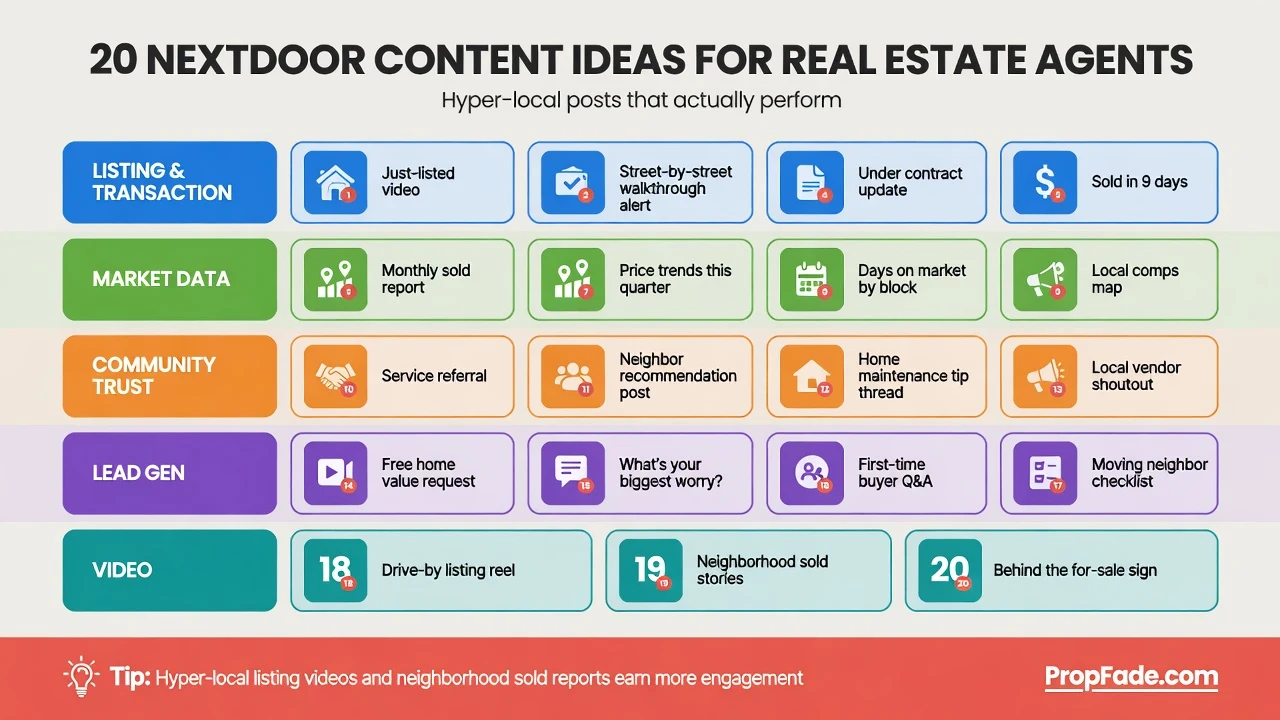
Listing and transaction content
1. Just-listed video post. Share a 30 to 45 second listing video in the property’s neighborhood feed. Include the street name, the price, bed and bath count, and one standout feature in the caption. Just-listed captions offer copy-ready phrasing for this post type.
2. Under-contract announcement. Post to the seller’s neighbors when a home goes under contract. A short note, “A home on your street accepted an offer in [X] days,” signals active market demand and invites neighbors to ask what their own home is worth.
3. Just-sold post with neighborhood data. Share the final sale price and days on market as a local data point, not a promotional announcement. Frame it as neighborhood market intelligence. Just-sold captions are ready to copy for this format.
4. Open house neighborhood invite. Post to the property’s neighborhood 48 hours before the open house. Include the date, time, and address plus one photo or a short walk-through clip. Open house captions make this a two-minute task.
5. Price-reduced update. A concise post with the new price and a direct link to the listing. Keep the tone informational, because urgency phrasing reads as promotional in a community feed.
Market and data content
6. Monthly neighborhood sold report. Share the median sale price, average days on market, and number of transactions for the specific neighborhood or zip code. Market update captions are built for this format and adapt easily to Nextdoor’s community tone.
7. Weekly “Homes sold near you” digest. A Friday post listing every home that sold in the neighborhood that week, with prices and days on market. Neighbors treat this format as local news rather than advertising, which keeps your name visible without friction.
8. Year-over-year price comparison. A short post comparing this month’s median price to the same month last year for the specific neighborhood. Ground every number in the local area, because a zip-level fact lands better than a regional average in a community feed.
9. Open market Q&A thread. Post a question asking neighbors what they want to know about local prices or inventory. Engage every reply with a specific, data-backed answer. Threads with multiple replies generate more ongoing reach than single posts.
Community and trust-building content
10. Local service provider recommendation. Share the contact for the plumber, painter, or landscaper your recent client used. Community recommendations build goodwill and keep your name in the neighborhood feed between listings.
11. Local spotlight post. Highlight a new business, park improvement, or school news in the neighborhood. Add a note about how the development affects nearby home values. Local spotlight captions offer phrasing that fits the community tone.
12. Seasonal home maintenance reminder. A pre-winter gutter-cleaning tip or a spring HVAC check reminder earns genuine engagement because it provides immediate value, with your name and brokerage attached as the source.
13. Neighbor testimonial. Share a short first-person testimonial from a client who lives in the neighborhood, with their permission. First-person language (“I worked with [agent] to sell my home on Elm Street”) outperforms third-person on Nextdoor’s community format.
Lead-generation content
14. “Thinking of selling in [neighborhood]?” post. Mention the current buyer activity in the area and invite neighbors to reach out for a private estimate. Keep the post under 100 words and close with a DM call to action rather than a phone number.
15. Home value offer. Post a specific offer to run a current market value estimate for any neighbor who reaches out. This surfaces leads from homeowners already thinking about selling, with no ad spend required.
16. Referral request. A short post asking neighbors if they know anyone who wants to buy or sell nearby. Most Nextdoor users know someone in the process, and the platform’s community format makes referral requests feel natural.
17. Before-and-after staging post. Share photos from a recent local listing, before and after staging. Frame it as a practical tip for neighbors preparing their home for sale.
Listing video content
18. Listing video from photos. Upload 12 to 20 listing photos to PropFade, confirm the property details, and export a finished listing video in about two minutes. The tool renders a 9:16 vertical cut and a 1:1 square cut from one photo set, so the Nextdoor post and the main social feed post come from a single project.
Create Nextdoor content
Upload your photos and get a finished video back in about two minutes.
19. Neighborhood tour video. A 60-second tour of the neighborhood itself, the walkability, the nearby parks, the street character, shot on a phone and posted to introduce the area to buyers browsing Nextdoor from other parts of the city.
20. Listing recap with final stats. A short video that revisits a just-sold listing with the final price, days on market, and one fact about what made it sell. Post it to the same neighborhood feed where the original listing first appeared, giving the story a satisfying close.
Nextdoor real estate FAQ
The most common questions from agents starting on Nextdoor cover whether the platform generates real leads, what content format works best, and how to build an audience in neighborhoods without active listings.
Frequently asked questions
Nextdoor is effective for agents targeting sellers in a specific neighborhood. The platform's geographic targeting puts listing content, market updates, and referral requests in front of neighbors who watch the local market closely. Agents who post consistently over several months build a local presence that search advertising cannot replicate.
The highest-performing content for agents on Nextdoor includes just-listed and just-sold posts with neighborhood-specific data, monthly local market reports, community spotlights, and short listing videos. Each post should reference a specific street, neighborhood, or local detail to match the community tone of the platform and avoid reading as generic advertising.
Agents grow on Nextdoor by claiming and verifying a Business Page, posting two to four times per week with community-toned content, and replying to every comment within a few hours. Offering genuine local value such as market data, service recommendations, and home value estimates builds neighborhood visibility over time more reliably than promotional posts.
Common Nextdoor mistakes that cost agents visibility
The most common mistake is using a promotional tone in a community feed. Nextdoor users expect neighbor-to-neighbor communication, and posts that read as advertisements earn negative reactions that reduce reach in the feed algorithm.
Hard-sell captions. Phrases like “limited time,” “act now,” or “call me today” fit paid advertising but feel out of place in a community feed. Write in an informational tone that leads with data and invites action at the end.
Reposting Instagram content without editing. A caption written for Instagram, with hashtags and promotional framing, reads as inauthentic on Nextdoor. Rewrite each caption with a neighbor-to-neighbor voice before posting to the community feed.
Over-posting. Two to four posts per week is the practical ceiling for a real estate business page. Posting more frequently can trigger friction from community members and may flag the account for review, limiting future reach.
Skipping replies. Nextdoor rewards accounts that engage with comments. A neighbor who asks a question on your post and gets no reply within a few hours signals low-quality content to the platform, which reduces reach on subsequent posts.
Missing the neighborhood targeting option. Paid Nextdoor placement lets you select which neighborhood or neighborhoods to reach. Skipping this setting means paid content goes to a broader, less relevant audience rather than the neighbors most likely to know a buyer or seller.
Posting with no local anchor. Every Nextdoor post should reference the specific street, neighborhood, or local detail that connects it to the readers in that feed. A market update that doesn’t name the neighborhood reads as generic, and Nextdoor community members scroll past content with no clear local relevance.
Nextdoor captions and posting tips for real estate content
Effective Nextdoor captions open with a local reference (the street name, the neighborhood, or a community detail) and close with one clear action. Keep them under 150 words and write in first person.
| Setting | Recommendation | Why it matters |
|---|---|---|
| Video length | 30 to 60 seconds | Long enough to show the property or neighborhood without feeling promotional |
| Image ratio | 1:1 square or 9:16 vertical | Square works in feed previews; vertical works when repurposed from Reels |
| Caption length | Under 150 words | Keeps the post readable in a community feed |
| Post frequency | 2 to 4 posts per week | Maintains presence without overwhelming neighbors |
| Tone | First person and informational | Matches Nextdoor's neighbor-to-neighbor context better than ad copy |
Caption templates you can copy today:
Just-listed: “A home just hit the market on [Street Name] in [Neighborhood]. [X] beds, [X] baths, [X] sq ft, listed at $[price]. Full listing in the comments. DM me if you’d like a private tour.”
Market update: “[Neighborhood] update for [month]: [X] homes sold, median price $[X], average [X] days on market. Happy to answer any questions about your specific street.”
Home value offer: “If you’ve been curious what your home on [Street] is worth right now, I run an estimate for neighbors anytime. DM me your address.”
Just-sold: “Sold: [Street Name]. Final price $[X], [X] days on market. If you’re thinking about selling in [Neighborhood], now is a good time to look at the numbers. DM me.”
Compliance reminder for agents: Include your brokerage name and license number in listing and sold posts as required by your state licensing board. Get client permission before sharing sold details or testimonials. Use neutral, descriptive language in all posts and avoid phrasing that could imply preferences tied to neighborhood demographics or other protected characteristics. Fair housing rules apply to all real estate marketing, including social media.
Posting time and frequency:
Post on weekday evenings, roughly 6 p.m. to 9 p.m. local time, when neighborhood scroll activity tends to peak. Tuesday through Thursday evenings are a reasonable starting window; test them against weekend mornings in your specific neighborhoods and track which times generate replies, since the best window varies by market. Stick to two to four posts per week and vary the content type so the feed stays fresh.
An AI real estate video editor speeds the listing video step significantly, rendering a 9:16 vertical cut and a 1:1 square cut from your listing photos, so you can post the vertical version to Nextdoor and repurpose the square cut for your main social feed from one project.